Test grids: the ten minutes that stop you ruining a real piece
Stop guessing and start proving. Laser test grids are the fastest, cheapest way to dial in your fiber laser settings for new materials, saving you from expensive mistakes on real jewelry.
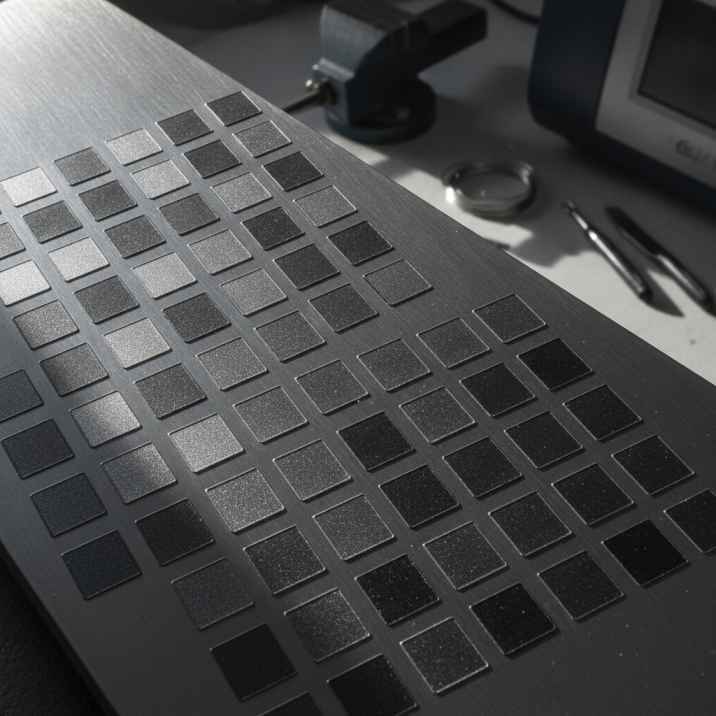
There is nothing worse than placing a piece of carefully crafted, expensive sterling silver on the laser bed, running a job you think are the right settings, and watching it ruin. We have all been there. The good news is that it is avoidable: a simple test grid on a piece of scrap metal costs ten minutes and stops you losing a real piece.
Our workshop in Málaga cuts and engraves sterling silver every working day. We learned the hard way that guessing parameters is a losing game. Here is exactly how we run a test grid to find new settings, what we look for, and what to do with the numbers once you have them.
Why Test Grids Are Non-Negotiable (and Why "Guessing" Costs Money)
Every laser machine, every material, and every thickness behaves differently. Your 100 W fiber laser is not exactly the same as ours, even if it is the same brand. Your silver alloy is probably not the same as ours. Your focus height may be different. If you are marking stainless steel, 18k gold, or a new sheet of sterling silver from a different supplier, the parameters you need will change.
Trying to guess the right power, speed, or number of passes on a real piece of jewelry is guaranteed to cost you. You will either under-mark it (too shallow, too light, not cut through) or over-mark it (too deep, melted, wide kerf, distorted). Both are expensive mistakes.
A test grid allows you to explore a range of settings methodically on cheap scrap. It gives you visual, physical proof of what each parameter does, and lets you dial in your specific machine for your specific material. This is what parameter calibration is all about.
Laser Safety First: A Quick Reminder
Before we talk about running the machine, a non-negotiable reminder about safety: a fiber marking laser is a Class 4 device. The 1064 nm beam is invisible and causes permanent eye damage instantly and silently. Always wear laser safety glasses rated for 1064 nm (with an OD suitable for your source power), and ensure everyone else in the room is doing the same. Metal is a mirror, and reflections go everywhere. Never leave a running job unattended, and always use proper fume extraction with an appropriate filter. For a more complete rundown, see our Class 4 Laser Safety Checklist.
Building Your Test Grid
The goal is a series of small marks, each with different settings, clearly labelled. This is how we approach it:
The Scrap Piece: Your Best Friend
You cannot calibrate on a real piece. Always use a small coupon of scrap metal that is the exact same alloy and thickness as your finished piece. If you are cutting 0.8 mm sterling silver, your scrap should be 0.8 mm sterling silver. This is not optional.
Preparing Your EzCad3 File
- Design a Simple Shape: Create a small square or circle in EzCad3. This will be your test mark. Make it small enough that you can fit many on your scrap piece, perhaps 5 x 5 mm.
- Duplicate and Arrange: Duplicate this shape into a grid pattern. For example, a 3x3 or 4x4 grid. Leave enough space between them to read the labels and inspect the marks without interference.
- Label Each Mark: This is critical. For each square, add a small text object next to it that displays the parameters you will use for that specific square. This might be "P95 S190 K60" (Power 95%, Speed 190 mm/s, Frequency 60 kHz) or whatever variables you are testing.
- Set Initial Parameters: For your first test, load a default set of parameters into your EzCad3 pen library that you know is approximately in the right ballpark. This will be your starting point.
Focus, Power, Speed, Frequency, Passes: The Variables
When running a grid, change one variable at a time. This is the only way to understand cause and effect. We usually start by varying speed or power, then frequency, then passes. If you have a MOPA source, you will also have pulse width to consider. Remember to set your correct focus height before starting anything.
- Speed: How fast the beam moves. Slower generally means more energy per millimetre, deeper marks or cuts. Vary this in steps (e.g., 100 mm/s, 150 mm/s, 200 mm/s).
- Power (%): The average power output. More power means more energy. Vary this in steps (e.g., 80%, 90%, 95%). For cutting, we usually max this out at 95% and rely on passes.
- Frequency (kHz): Pulses per second. At a fixed power, higher frequency means weaker individual pulses. For cutting silver, high frequency wins (like 60 kHz). For deep engraving, lower frequency means fatter pulses and more depth (like 30 kHz).
- Passes / Loops: How many times the laser repeats the entire geometry. This is the honest way to get depth for both engraving and cutting.
- Pulse Width (ns): (MOPA sources only). Long pulses (150-250 ns) are for depth and cutting. Short pulses (2-20 ns) are for fine surface marks or color marking.
Running the Grid: What to Look For
After marking your grid, carefully inspect each square. You are looking for the 'just right' setting that achieves your goal (a clean cut, a specific engraving depth) without overdoing it.
For Engraving
You want a consistent, crisp mark at the desired depth, without excessive melting or splatter around the edges. For deep engraving, ensure the bottom of the mark is relatively flat and deep enough for enamel fill if that is your goal. For a light surface mark, ensure it is visible and uniform.
Remember that for depth, lower the frequency before you raise the power. Our own deep engraving recipe for silver uses 100% power, 600 mm/s, 30 kHz, 10 passes with a 200 ns pulse width on our MOPA source.
For Cutting
The goal is a clean, through-cut with minimal kerf width and no re-welding. You need to physically remove the scrap piece from the machine and try to pop out the cut pieces. If they do not fall out cleanly, it is not a through-cut. We found that if a recipe that used to cut suddenly only engraves a line, the first thing to check is the wobble diameter setting. A wobble that is too small will not cut at all. Our working recipe for silver cutting uses a wobble diameter of 0.15 mm.
For cutting, you want to find the lowest number of passes that just barely gets through. Going far beyond that widens the kerf, heats the piece, and can distort thin sections.
Our Silver Cutting Numbers (as a starting point)For cutting sterling silver, our common recipe is 95% power, 190 mm/s, 60 kHz, with wobble enabled. The critical lever is the pass count. These are numbers we have measured on our own machine with our specific hard silver alloy:
- 0.8 mm sterling silver: 17 passes
- 0.9 mm sterling silver: 21 passes
- 1.0 mm sterling silver: 28-29 passes
Remember, these are our numbers on our machine. Your results will vary, and you must prove them on scrap.
Our Gold Cutting Numbers (as a derived starting point)Gold is noticeably easier to cut than silver because it is less reflective. We developed the following table by scaling down our measured silver numbers. These are the starting points we use in our own software, but they are derived, not measured on actual gold. You must prove them on scrap of your specific gold alloy.
The core recipe remains the same: 95% power, 190 mm/s, 60 kHz, wobble on.
| Sheet thickness (mm) | Gold passes (starting point) |
|---|---|
| 0.25 - 0.4 | 2 |
| 0.5 | 3 |
| 0.6 | 4 |
| 0.7 | 6 |
| 0.8 | 9 |
| 0.9 | 11 |
| 1.0 | 14 |
Start low and work up. Karat and alloy change everything; this table assumes a typical yellow gold.
Locking Down Your Recipe: Write it Down
Once you find the perfect settings, write them down immediately. A recipe is only reproducible if you record every detail. We keep a physical logbook in the workshop, and a digital one. Make sure to note:
- Material: E.g., "Sterling Silver 925" or "18k Yellow Gold"
- Thickness: E.g., "0.8 mm sheet"
- Target Use: E.g., "Through-cut" or "Deep enamel engrave"
- Focus Height: The exact distance from lens to material.
- Power (%):
- Speed (mm/s):
- Frequency (kHz):
- Pulse Width (ns): (if applicable)
- Passes / Loops:
- Wobble Settings: Diameter, end diameter, distance (if cutting).
- Other EzCad3 settings: Any critical TC delays, jump speeds, or contour settings.
When to Recalibrate
"It worked last month" is not a setting. You need to run a new test grid when:
- You get a new batch of material, even if it is theoretically the same.
- You change material suppliers.
- You start working with a different alloy (e.g., from 14k to 18k gold).
- You change the height of your jig or work platform.
- You clean your optics (lens, mirrors).
- The machine has been serviced or moved.
Practical Takeaways: What We Actually Do
In our workshop, we have learned that precision saves time and money. Here is our daily reality:
- Always use scrap: Never calibrate on a real piece. It is the cheapest insurance you can buy.
- Change one variable: Don't try to find the perfect speed and power at the same time. Test systematically.
- Document everything: A good recipe is only useful if you remember all its components.
- Understand your material: Silver is hard; gold is easier. Never judge a machine or your skill on silver alone. The laser leaves a black edge on precious metals, so plan for polishing after marking.
- Start with a known baseline: Use our published numbers as a starting point, but always verify them for your machine and material.
Ten minutes spent on a test grid can save hours of frustration and hundreds of euros in ruined material. It is a fundamental practice for any serious laser workshop.