Your Relief Looks Like a Contour Map: Where Terraces Come From
Are your laser-engraved 3D reliefs showing visible steps, like a topographic map? We’ve faced this exact problem on sterling silver and found the causes and solutions after losing plenty of material.
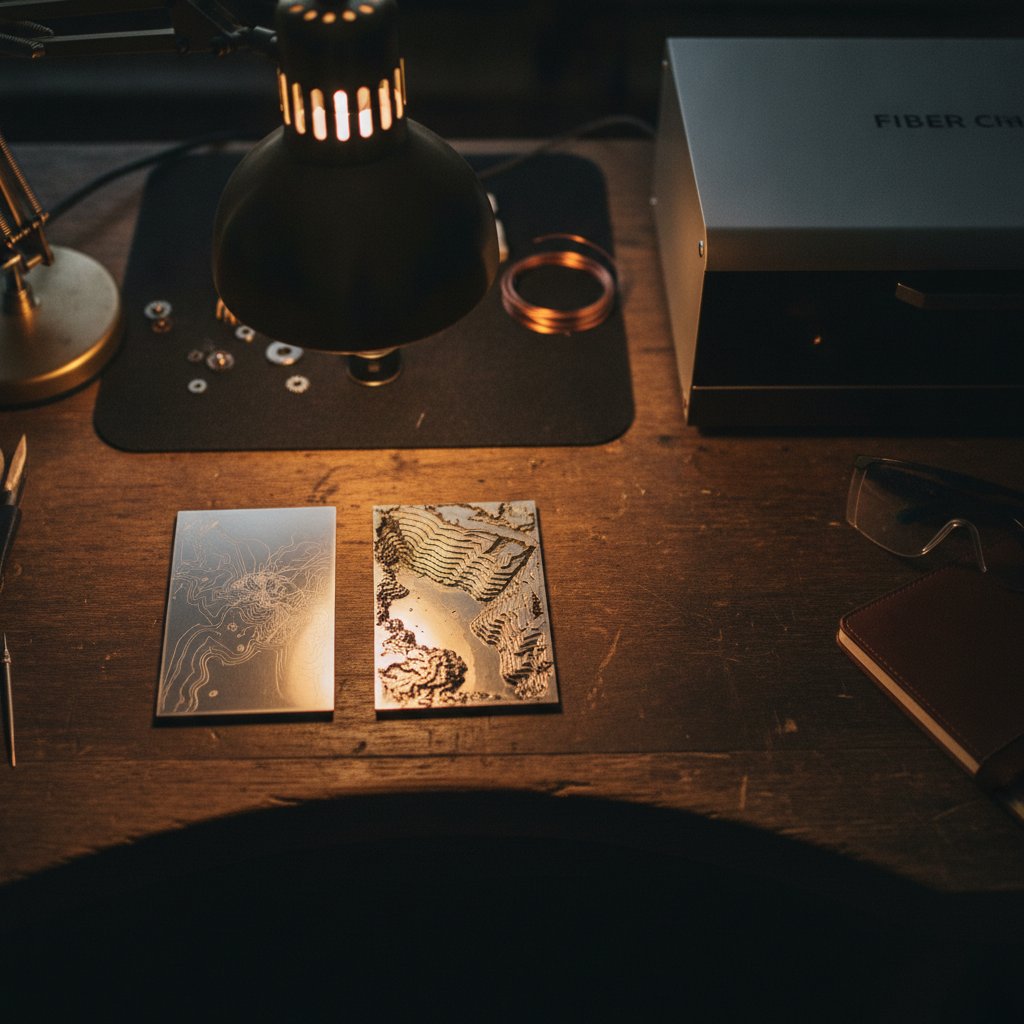
If you are trying to engrave a three-dimensional relief with your fiber laser, you have probably already seen it: visible, stepped contours on gentle slopes, making your design look less like a smooth sculpture and more like a topographic map. These "terraces" are a classic artefact of layered relief engraving, and they are the main reason your 3D engraving has steps instead of a smooth gradient.
The core problem is that your machine creates depth by removing material in discrete layers, and there's a limit to how thin those layers can practically be. The solution isn't just about dropping the Z-axis in ever smaller increments; it involves a fundamental shift in how you tell the laser to create depth.
Before we dive into the specifics, remember that a fiber marking laser is a Class 4 device. The 1064 nm beam and its reflections are invisible and cause instant, permanent eye damage. Always wear laser safety glasses rated for 1064 nm (with an OD suitable for your source power), ensure proper fume extraction is running, and never leave a job unattended. Physical enclosures are your real protection, not software interlocks.
Understanding Terraces: The Layered Problem
Relief engraving, often called 2.5D work, removes material in layers. You engrave a mask, then the Z-axis drops by a predetermined step, and the next mask is engraved. This process repeats, slowly building up depth in your material. It sounds simple enough, but the reality is more complex:
- Depth is not what you order. The amount of material removed per layer is not directly proportional to your Z-step setting. On our machine, engraving sterling silver at 95 % power, 700 mm/s speed, 40 kHz frequency with a 0.03 mm Z-step, we measured about 18 µm removed per layer. If we asked for a total depth of 1 mm, we often achieved closer to 0.6 mm – about 60 % of the target. This calibration is highly specific to our exact recipe, material, and machine; change any parameter, and you must measure again on scrap material.
- Discrete layers create steps. Because material is removed in distinct "bites" (layers), any area of your design that should have a gentle, continuous slope will instead show these individual layer boundaries as terraces. This is particularly noticeable where the design has broad, gradual changes in depth.
The Limits of Z-Axis Layering
The most intuitive, but ultimately ineffective, approach to fixing terraces is to simply make the Z-axis steps smaller. If 0.03 mm steps create visible lines, why not use 0.01 mm, or even 0.005 mm?
The problem is the laser's focus. A laser needs to be focused at or very near the material surface to work efficiently. As the Z-axis drops, the laser spot becomes increasingly defocused. At roughly a millimetre of defocus, the laser spot is too large and diffuse to work usefully for precision engraving. It just won't remove material effectively, regardless of how many passes you run.
This means you cannot simply drop Z by infinitesimally small amounts across a significant depth range and expect a smooth result. There's a practical ceiling to how many focused layers you can achieve before the laser becomes too defocused to be effective.
The Key to Smooth Relief: Modulating Energy
If simply making Z-steps smaller won't work, what does? The real solution to achieving smooth, continuous gradients in relief engraving is to modulate the laser's energy by depth, rather than relying solely on Z-axis movement for the final result. This is the secret to getting a truly smooth laser relief instead of obvious 3D engraving steps.
Here is the approach that worked for us on sterling silver:
- Initial Layered Removal: Perform the bulk of the material removal using the standard layered approach, dropping the Z-axis by your calibrated step (e.g., 0.03 mm on our machine) for each layer. This gets you to the approximate shape and depth.
- Final Energy Modulation Pass(es): Once the layered removal is complete, perform one or more final passes with the laser focused at the optimal height (typically the original surface, or slightly above the deepest point, depending on the desired effect). In these final passes, the Z-axis does not move. Instead, the laser's energy is modulated based on the intended depth.
How does energy modulation work?
- Deeper areas of your design receive more laser energy. This can be achieved by increasing the number of passes (LOOP), increasing the power (%), or using a combination of parameters that deliver more energy per pulse.
- Shallower areas receive less laser energy. This means fewer passes, lower power, or settings that deliver gentler pulses.
By applying energy proportionally to depth in these final passes, you effectively "melt" and blend the discrete steps created by the initial layering. This process creates a continuous gradient that smooths out the terraces, transforming your contour map into a more natural-looking relief.
Beyond Smoothness: Detail in Your 3D Engraving
Once you have addressed the fundamental issue of terraces, you can focus on achieving finer detail and sharper features in your relief work. These aspects are critical for any professional jewelry piece.
Half-Step Dithering for Fine Features
When you create layer masks from a greyscale image, a hard threshold means a pixel either engraves or it does not. Any feature shallower than one full layer step simply disappears completely from the job. For us, features under about 0.05 mm vanished. This is a significant problem for intricate designs.
Using partial coverage (often called dithering) instead of a hard yes/no threshold brings sub-step detail back. Instead of marking a full pixel or nothing, dithering patterns allow you to approximate intermediate depths by marking only a percentage of the pixels in an area. As a bonus, this partial coverage helps blend the terraces on gentle slopes because the laser spot blurs the pattern, further contributing to a smooth laser relief. The trade-off is that it typically requires more segments, making the job run longer.
Edge Compensation for Crisp Walls
Just like with kerf compensation in flat engraving, the laser spot has a width. If you engrave a layer mask directly, the spot's width will cause the edges of your engraved areas to "fatten" outwards, resulting in soft, sloped walls and rounded features rather than crisp, vertical ones. This makes your relief look muddy.
The fix is to apply edge compensation: erode each layer mask by about half a spot diameter before marking. On sterling silver, we work in the 0.04-0.06 mm range for this. When the laser then marks the shrunk area, the spot's width expands it back to the correct size, giving you crisp walls and sharp features.
The Resolution Ceiling
While you want maximum detail, there is a practical resolution ceiling for relief engraving. The finer the step you ask for (either in Z-axis layers or in horizontal pixel resolution), the larger the data file the software has to process. In practice, you often need to trade piece size against detail: a 0.02 mm step is realistic on small, jewelry-sized pieces, but for larger pieces, you may have to accept a coarser step to keep job processing times and file sizes manageable.
Our Silver Relief Settings and What They Mean
Here are some of the key parameters we use on our 100 W MOPA fiber laser with a JCZ DLC2 controller for relief engraving sterling silver. Remember, these are specific to our machine and our material; you must test and calibrate for your own setup.
| Parameter | Our Setting (Sterling Silver) | Impact on Relief Engraving |
|---|---|---|
| Speed | 700 mm/s |
Controls how fast the galvos move. A moderate speed allows for good energy delivery per millimetre for material removal without melting too much. |
| Power (%) | 95 % |
High average power is crucial for removing material efficiently, especially for deeper reliefs. |
| Frequency (kHz) | 40 kHz |
At a fixed power, lower frequencies mean stronger individual pulses. 40 kHz provides a good balance for ablating silver effectively. |
| Pulse Width (ns) | 200 ns |
For MOPA sources, longer pulses put more energy into each shot and are effective for digging into metal. |
| Passes (LOOP) | 5 per layer |
The honest way to achieve depth. This number is often varied for energy modulation in smoothing passes. |
| Measured Layer Depth | ~18 µm |
This is the actual material removed per layer on our machine with these settings. It's critical to measure this for your own calibration. |
| Jump Speed | 2000 mm/s |
We learned that slow jumps drag faint lines across the work. Keeping this fast (the EzCad3 default) prevents visible jump residue between marked areas, which is important for clean layered work. |
| Laser Off TC | 100 µs |
This delay ensures the laser beam is fully off before the galvos jump to the next segment. Too short, and you'll get stray lines. |
Practical Takeaways: Your First Steps to Smooth Relief
Achieving truly smooth relief engraving without visible terraces is a journey, but here's what we would do first, based on our experience:
- Calibrate Your Depth First: Before chasing perfect smoothness, understand how much material your machine actually removes per layer with your chosen parameters on your specific material. Engrave a simple stepped test block and measure the actual depths achieved versus what you asked for. This is fundamental.
- Understand the Defocus Limit: Accept that there's a practical limit to how many Z-axis drops you can make before the laser becomes too defocused to work. Don't try to fix terraces by just making Z-steps infinitesimally small.
- Prioritize Energy Modulation for Smoothing: Once you've removed the bulk of the material in layers, plan for a final pass (or several) at the optimal focus height. In these passes, modulate the laser's energy by depth rather than moving the Z-axis. This is the most effective way to blend those 3D engraving steps into a continuous gradient.
- Think About Detail Early: Incorporate dithering and edge compensation into your workflow. Dithering brings back fine sub-step details, and edge compensation gives you crisp walls instead of soft, melted mounds.
- Always Test on Scrap: Never engrave a customer piece without first running a test. Test grids: the ten minutes that stop you ruining a real piece can save you hours of wasted material and frustration.